Features

ServiceBridge empowers your team in the field, the office, and beyond.

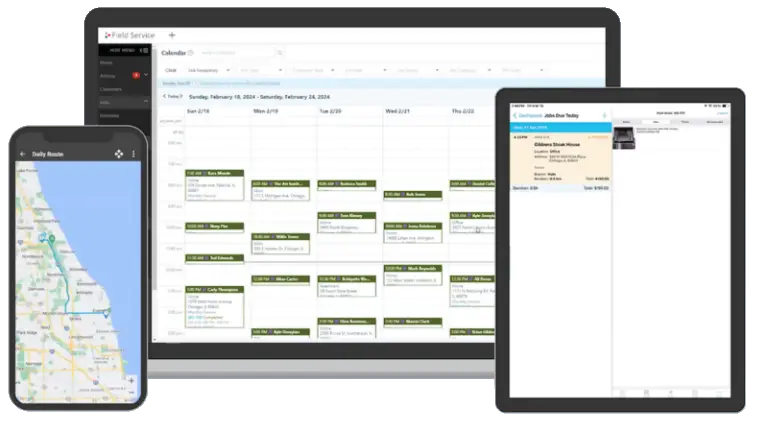
ServiceBridge field service app with job map interface

Manage Customer Data

Manage every stage of the customer journey with ServiceBridge CRM. From detailed, accurate estimates to setting up recurring work orders and soliciting feedback, ServiceBridge gives your business a full suite of tools designed to manage your workflow, keep your customers happy, and help you grow your service business.

Search functionality icon

Customer Management

Create and manage customer contact and location information from any device
ServiceBridge mobile app icon in black

Asset Management

Detailed service records and recurring schedules for customer installed equipment
Estimating or job cost calculator icon

Estimates

Easily create detailed, accurate estimates for customers and prospects
Task list or checklist icon

Work Orders

Create detailed work orders and see their status in real time with calendar, map and report views
Appointment scheduling calendar icon

Scheduling

Assign the right team to the right job with intuitive scheduling tools
Job scheduling and time tracking icon

Dispatching

Assign jobs to your team based on current location with real-time dispatching
Technician location pin user icon

GPS Tracking

Know where your team members are and track their progress in real-time
Job scheduling and time tracking icon

Notifications

Provide team members and customers with timely notifications on upcoming jobs
Invoice and receipt management icon

Invoicing

Simplify billing and send your customers detailed, accurate invoices in minutes
Mobile payment card processing icon

Payments

Simplify payment collection with integrated card reader and payment processing support.
Workflow automation or job routing icon

QuickBooks Online

Our powerful two-way sync with QuickBooks Online eliminates accounting errors

Manage Your Workflow

Give your team the tools to succeed, from office administrators to field technicians. ServiceBridge’s powerful Job Management system makes it easy to tackle everything from estimates to complex multi-day projects. Keep your team moving and get more jobs done with ServiceBridge.

Field service software dashboard on laptop icon

Project Management

Create, schedule, and invoice multi-day or multi-part jobs with ease
Business hours and availability scheduling icon

Timesheets

Create transparency and ensure accurate payroll with integrated timesheets
Inventory and asset management icon

Products & Services

A full inventory of products, parts, services, and bundles available on your mobile device
ServiceBridge settings configuration icon

Service Contracts

Manage service contracts and warranties with job history, serial number, make, model and more
Secure field service software security shield icon

Roles & Permissions

Set customized permissions for your team members to help keep sensitive date secured
Text content window interface icon

Customer Portal

Create transparency for your customers by sharing work orders, photos, and more

Grow Your Service Business

Nobody starts a business with the goal of staying small. ServiceBridge gives your service business the tools to empower grow – from supporting multiple branches to franchise settings, we give your business the tools to expand and grow your bottom line.

Field technician handoff or document sharing icon

Commissions

Help your team members grow with your company by setting up custom commission roles.
Job tagging and labeling icon

Custom Pricing

Create customized pricing and offers for your customers based on specific criteria
Customer star rating icon

Customer Reviews

Generate five-star reviews for your business with Reviewbuzz integration

Manage Your Franchise

Manage a network of franchise locations at scale ensuring consistent brand, service quality, and business workflows across the entire network.

Organizational hierarchy structure icon

Multi-Location Management

Access and report on multiple company branches from a single dashboard
Fitness or service industry icon graphic

National Accounts

Service national customers with consolidated invoicing and assignment to top-performing locations
Technician location tracking map pin icon

Territory Management

Auto-assign customers to the correct franchise territory, and get notified of out-of-territory work
Revenue growth and payments icon

Royalty Collection

Configure and customize royalty payments for each franchisee within ServiceBridge
Business goals and performance target icon

Marketing ROI

Analyze marketing campaign return on investment across your entire franchise network
Premium plan or enterprise feature crown icon

Brand Consistency

Create a professional, consistent brand across your locations with customized templates
Software settings gear icon

Mandated Settings

Ensure a consistent workflow at each location with mandated settings and fields
Tailored to Your Business

No one piece of software can do everything for your business. That’s why ServiceBridge offers a number of plugins and integrations, including a best-in-class accounting sync for QuickBooks Online and a powerful Public API that connects ServiceBridge to endless third-party web applications.

Retrieving data. Wait a few seconds and try to cut or copy again.

Public API

Use our robust Public API to connect ServiceBridge to endless third-party applications
Business performance analytics pie chart icon

Custom Reports

Create custom reports, tables, and charts tailored to your business needs
Workflow process checklist icon

Custom Forms & Templates

Tailor ServiceBridge to fit your workflow with custom work order templates, custom digital forms, branded e-mail templates and more.

We're Here For You

Your success is our success. At ServiceBridge, we’re with you every step of the way – from onboarding tools to help you get up to speed quickly, to live technical support that ensures your business keeps moving.

Team meeting or collaboration icon

Chat Support

Talk to a live ServiceBridge expert and receive troubleshooting in real-time over chat
Email newsletter subscription icon

Email Support

Contact our knowledgeable staff anytime through dedicated e-mail support

Phone Support

Speak directly to a ServiceBridge expert using our phone support
Retrieving data. Wait a few seconds and try to cut or copy again.

Help Documentation

Get quick answers to questions or watch video tutorials using our help documentation
Video player interface icon

Training Sessions

Get up to speed quickly with in-app guides or learn about advanced features with live webinars
Call Now Button